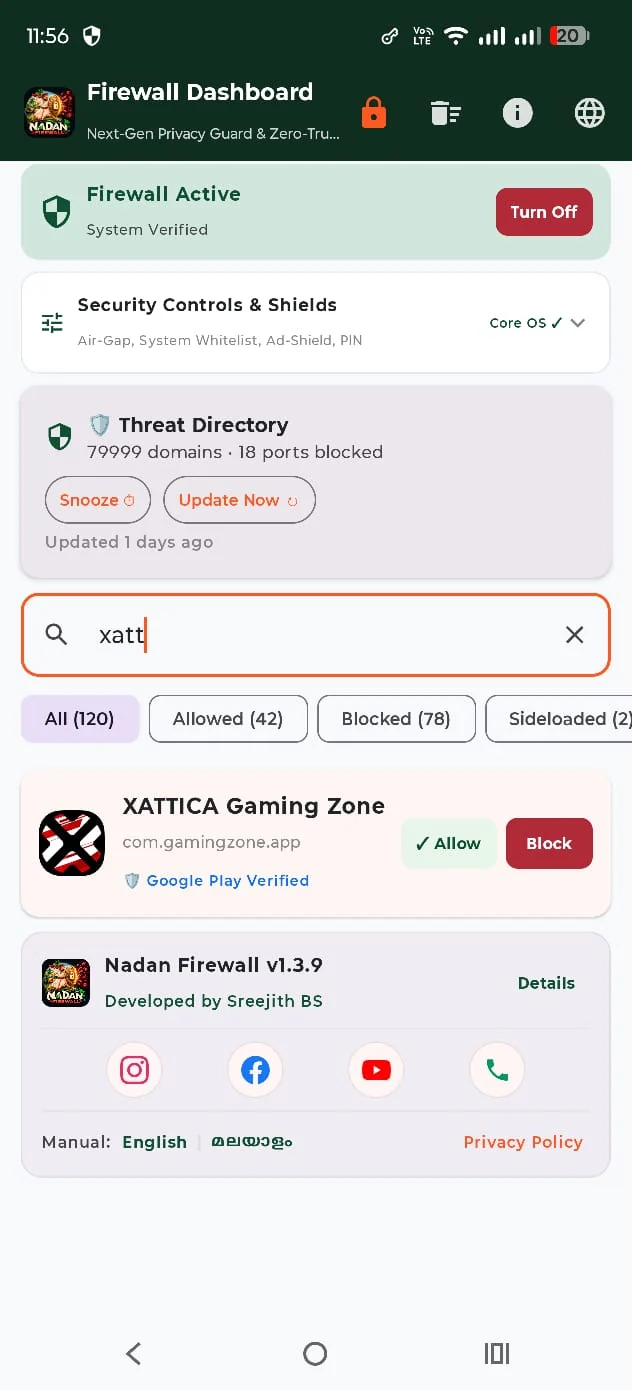
App-level control
Search installed apps and manage their network access with Allow and Block controls.

SOFTWARE SHOWCASE · ANDROID · WINDOWS
An Android and Windows firewall project focused on app-level network control, threat visibility and suspicious APK handling.
The Google Play button opens a search result, not a verified individual listing. The official release page hosts the project downloads and installation guides. Confirm the exact APK version and signature before installation.
INSIDE THE PRODUCT
Features are described from the available product information and supplied screenshots. Exact behaviour depends on the deployed build and configuration.
Search installed apps and manage their network access with Allow and Block controls.
The supplied dashboard displays 79,999 domains and 18 blocked ports. Counts can change with updates.
Dashboard controls include Air-Gap, System Whitelist, Ad-Shield and PIN.
Promote the suspicious APK handling and quarantine workflow without claiming perfect malware detection.
View the current firewall status and system verification indicator.
Read the published privacy policy and understand the permissions the app requires.
REAL APPLICATION
Actual supplied application screenshots are used wherever available. No fabricated product interface is presented as a real screen.
GETTING STARTED
Use the Play Store search link to locate the listing. Confirm the publisher and package before installing.
Read the requested Android permissions and firewall setup instructions.
Use the app list to review and manage network access.
Product details should be checked against the currently deployed release before installation or operational use.
TECH DRIVE · KOLLAM
Talk to our team about product access, setup and support.
Near Ushas Associates,
Pallimukk, Kollam – 691010,
Kerala, India